Question

How can individual courses in the course management that are not in a catalog, but are included in a visible learning plan be restricted from visibility for power users in the course management area?

  • May 11, 2026
  • 2 replies
  • 20 views

Forum|alt.badge.img+4

We have individual courses in the course management that are not in a catalog because we do not want power users or learners to have access to them individually. We want the courses in a learning plan that is visible so the power user or learner can enroll into them. 

This way the learning plan had prerequisites that only allowed the learner to take the courses in a particular order before enrolling in a ILT session or exam.

Now we are seeing that power users are seeing the individual courses in the course management area that are not in a catalog. Did something change? In the past, power users could not see individual courses that were not in a catalog even if they were part of a visible learning plan.


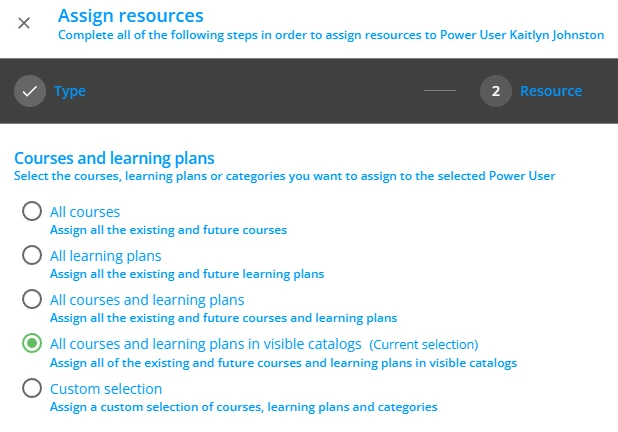
Do I need to make a change to the power users management? (see screen prints below)
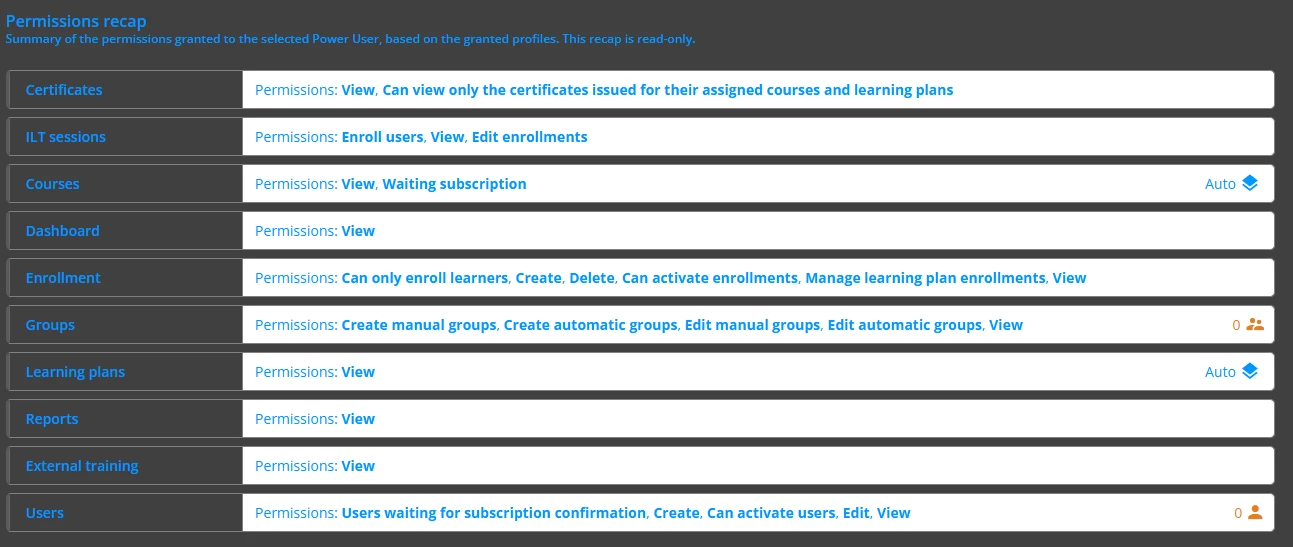


Please let me know what you have done to prevent power users from enrolling learners into courses in the course management area that are not in a catalog that they should not have access to even if the courses are in a visible learning plan.

Thank you! 

2 replies

Moshe.Machlav
Guide I
Forum|alt.badge.img+1

Hi ​@Swatson ,

Following up on this, since Docebo's native "Resource Inheritance" strictly forces course visibility when a Power User is assigned a Learning Plan, there is an alternative architectural approach you can take if hiding these courses from the Power User is your absolute top priority.

You can completely simulate the sequential Learning Plan experience using Catalogs combined with the Enrollment Rules App.

Here is how you can set up this workaround to get full flexibility:

  1. Ditch the Learning Plan: Remove the courses from the Learning Plan structure.

  2. The Catalog Gate: Place only the first course of your sequence into a specific Catalog. Assign this Catalog to the Power User as a resource, giving them "Course Catalogs / View" permissions. This becomes their only enrollment gateway.

  3. Automate the "Prerequisites": Use Docebo's Enrollment Rules App to recreate your strict learning path. Set up rules so that when a learner completes Course 1, the system automatically enrolls them into Course 2, and upon completion of Course 2, it enrolls them into the ILT session.

  4. Clean Up Resources: Ensure the Power User is not assigned the individual courses or their hidden categories as resources.

The Result: The Power User can initiate the learning journey by enrolling the user via the Catalog. The automation handles the strict sequential enrollment behind the scenes (effectively replacing the need for native Learning Plan prerequisites), and the Power User's Course Management view remains completely clear of those individual courses.

You can read more about setting up these automated chains here: Enrollment Rules App – Docebo Help Center

I hope this alternative approach gives you the exact flexibility you're looking for!


Forum|alt.badge.img+4
  • Author
  • Helper III
  • May 12, 2026

Thank you ​@Moshe.Machlav! I will look into this to see if this works for us.