I have pushed out an Annual Compliance training and have noticed a typo in one of the training materials (a SCORM file). I would like to be able to update the SCORM without resetting progress of those who have already completed the material. What is the best way to do this?
Best answer by Alan
Hi @kvdesigner_25 , In a situation like this, where it is just a typo being corrected and no structural changes (eg, new or removed pages), the best approach is to overwrite the old SCORM with the new one. You can do this via the Central Repository (CLOR):
Go to the SCORM’s settings in the CLOR (you can push a SCORM to the CLOR from the course shell if it’s not already in there).
Click Upload File to upload the new version
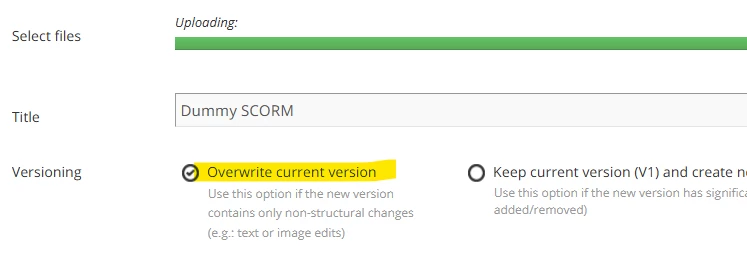
After the file has uploaded, select "Overwrite current version” and click save.
Learners will then see the new version when they next launch it. They will continue from where they left off and retain any previous scores etc. Note that the overwrite process does not always work and no errors are generated. The only way to be sure is to launch the course and manually check it is the new version. Embedding a version number on the title page can be helpful for this!
Hi @kvdesigner_25 , In a situation like this, where it is just a typo being corrected and no structural changes (eg, new or removed pages), the best approach is to overwrite the old SCORM with the new one. You can do this via the Central Repository (CLOR):
Go to the SCORM’s settings in the CLOR (you can push a SCORM to the CLOR from the course shell if it’s not already in there).
Click Upload File to upload the new version
After the file has uploaded, select "Overwrite current version” and click save.
Learners will then see the new version when they next launch it. They will continue from where they left off and retain any previous scores etc. Note that the overwrite process does not always work and no errors are generated. The only way to be sure is to launch the course and manually check it is the new version. Embedding a version number on the title page can be helpful for this!
Thank you so much! It did work and people did not lose progress! It is always nerve wracking to hit that “save” button when you aren’t quite sure but your comment was helpful!!