

Maximum Number of Attempts Reached - Login

  • November 3, 2025
  • 3 replies
  • 197 views

gstager
Hero III
Forum|alt.badge.img+9

Is anyone aware of a login limit per unit of time?

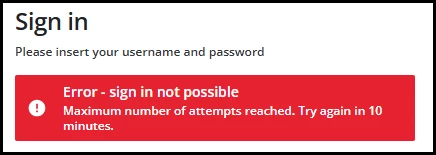
I have had some issues with users getting denied with a message saying maximum number of attempts reached. Try again in 10 minutes.

This is not a case of messing up the password beyond the number of failed attempts I have set but a message on the first attempt.

It comes up around the beginning of each month when I push out the monthly safety compliance training.

We then have a bunch of folks trying to log in at the same time and different folks each month have the issue.


3 replies

Forum|alt.badge.img+1
  • November 4, 2025

Not sure if this helps..


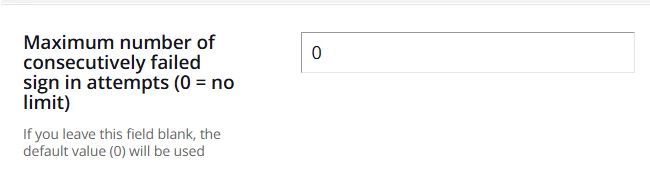
Advanced Settings>Users


Advanced Settings>Password


gstager
Hero III
Forum|alt.badge.img+9
  • Author
  • Hero III
  • November 4, 2025

@mstrom  -  no, like I said this is not a case of folks messing up their password. It isn’t about exceeding their failed attempts. 

This is a failure on the very first attempt with a good password.

I admit - to the users - they’re getting the impression that the password isn’t working.

But this message appears on their first attempt.


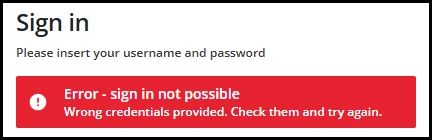
Compare with actual bad credentials


It seems to me that there is some sort of limit with how many can log in for a given time period. Like Docebo can’t handle a dozen people all trying to log in at the same time from different computers.


ldlmcoitrg
Influencer I
Forum|alt.badge.img
  • Influencer I
  • September 21, 2026

@gstager We experienced the same issue and I’ve encountered this information from this article - https://help.docebo.com/hc/en-us/articles/360020083040-Managing-the-password-policy I believe this is due to the fact that the block applies to the public IP address from which the sign-in to the system was attempted. I’ve created a support ticket for this since the affected users did not show any issues in the audit trail logs.
 

“Maximum number of consecutively failed sign in attempts: The default value for this parameter is 0 (zero), which allows your users an unlimited number of login attempts.

  • For security reasons it is strongly recommended to set a nonzero value in this field.

When the maximum number of failed attempts is reached, all subsequent sign-in attempts will be blocked for 10 minutes. The block applies to the public IP address from which the sign-in to the system was attempted.
→ Since the block happens on the public IP and not on the individual internal ethernet IP address, all the internal IPs of the same wifi network are blocked.”