Question

Reporting on Enrollment in Marketplace Courses


Bkatzman
Influencer III
Forum|alt.badge.img+1

Greetings!

I have tried exporting data from the Course Management page and have looked into building a custom report. Has anyone had success with exporting enrollment counts for MarketPlace courses? Thanks!


~B

7 replies

Bkatzman
Influencer III
Forum|alt.badge.img+1
  • Author
  • Influencer III
  • March 20, 2024

I ended up going through all the pages and copying the data into Excel. It was very tedious, but it got the job done. If there was a way to display more than 20 entries per page that would have made it a little easier. 


If there are better methods, I am all ears. Thanks!


lrnlab
Hero III
Forum|alt.badge.img+10
  • Hero III
  • March 20, 2024

If you imported them as courses you should be able to run any of the custom reports to get that data


  • Newcomer
  • October 12, 2026

​@lrnlab how would you filter for Content Marketplace courses in the report? We can only see a way to download a report for ALL e-learning courses, but ours are not all from the marketplace.


lrnlab
Hero III
Forum|alt.badge.img+10
  • Hero III
  • October 13, 2026

​@lrnlab how would you filter for Content Marketplace courses in the report? We can only see a way to download a report for ALL e-learning courses, but ours are not all from the marketplace.

you’re right ​@SDC_admin in Reports there is no filter specifically for these course. I created a category just for those courses and use that for reports. Please note that the category can only have 1 level (no subcategories since these are not included as data outputs in the reports). 

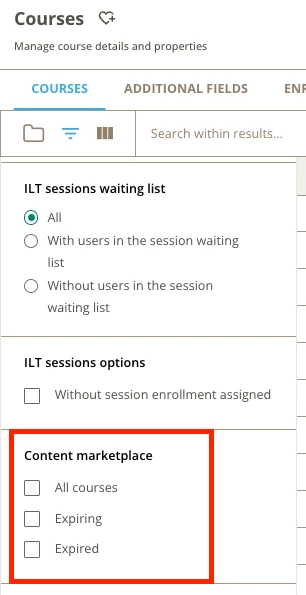
Depending on what report you are running, if you need a course export for example, there is a filter on the course management page for Content Marketplace courses only.


JKolodner
Guide I
Forum|alt.badge.img+8

​@lrnlab how would you filter for Content Marketplace courses in the report? We can only see a way to download a report for ALL e-learning courses, but ours are not all from the marketplace.

We use a custom field to name the owner of the course. For 3rd party content, we use “Docebo Content” or the equivalent. Then we can filter by that field.


  • Newcomer
  • October 16, 2026

​@JKolodner thank you. Where do you add that custom field? Do you have to manually add the “owner” to each course? We thought about adding something to the course codes, for example, but that would require manual intervention, which we’re trying to avoid.


JKolodner
Guide I
Forum|alt.badge.img+8
  • Guide I
  • October 16, 2026

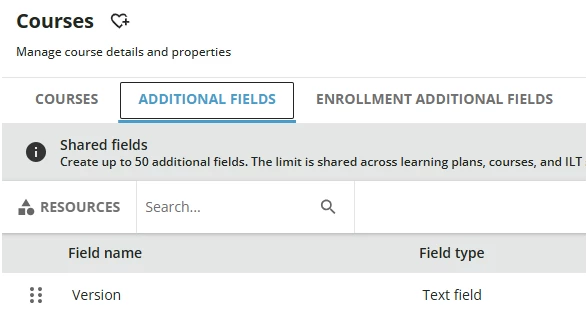
What I’m describing is a manual process, although you may be able to use APIs to take care of many at once. We use the course additional fields area to create new fields that can appear in custom reports and also in the Course Management export, I believe.