

Hi community,
We’re running into an issue with what appears to be “ghost” training materials in some of our courses.
In these cases, learners complete all visible training materials, but the course still shows as In Progress. This blocks them from progressing in their learning plan due to prerequisites.
Here’s what we’re seeing:
- The course has X amount of training materials, for example 20 training materials.
- The learner completes all 20 training materials, but the course stays In Progress.
- In the Learning Plan Learner View, it shows there are 21 materials, with only 20 completed.
- Both learners and admins can only see 20 materials (nothing is hidden).
- In the backend, under the Training Materials tab in course management, there are only 20 materials.
- However, in the Course Report → Training Materials Statistics, an extra (“ghost”) material appears, and is not assigned to any learners.
- Important note: this is not due to hidden materials, none are set as hidden.
Question:
Has anyone encountered this before, and is there a way to remove this ghost material?
Can this be resolved from the superadmin side, or does it require system support?
Thanks in advance for any guidance!
Example (with screenshots)
In the below example, the course contains only one training material.
Course Training Materials page and Learner View clearly shows only one material.
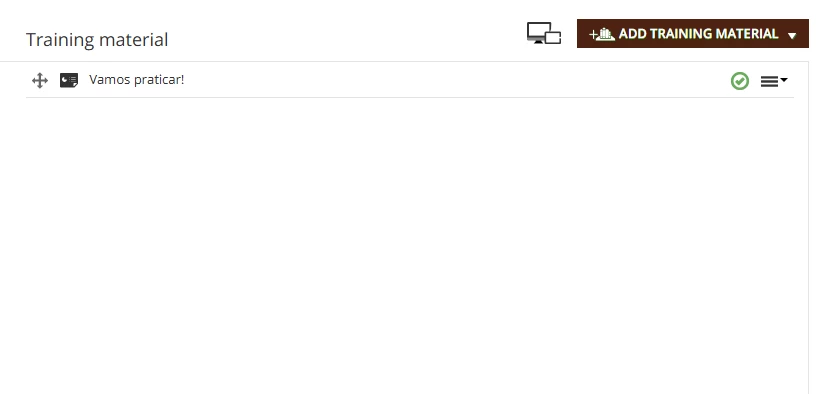
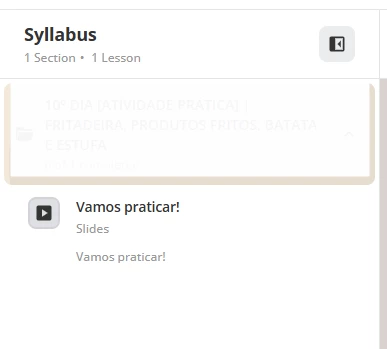
In the learning plan, a user who has completed the training material still sees the course marked as In Progress in the learning plan, with the message: “1 out of 2 training materials was completed” (even though there is clearly only one training material in the course).

In the Course Report page → Training Material Statistics, the Ghost material is seen:
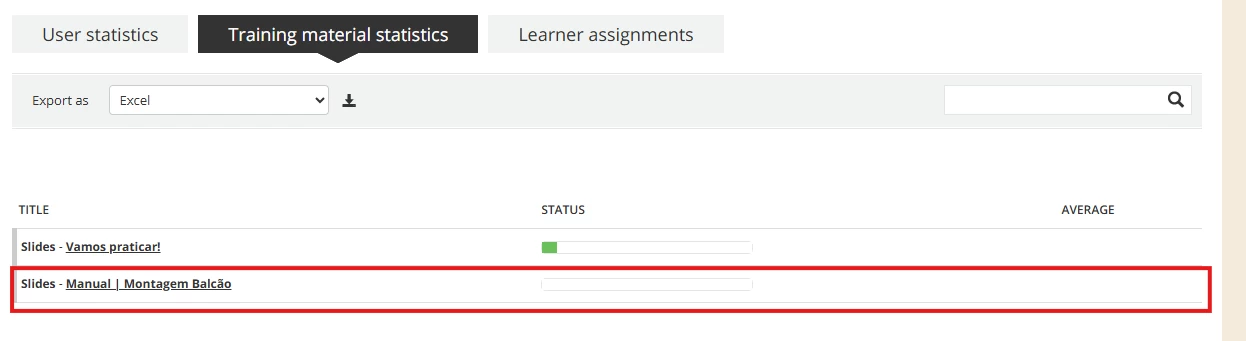
How do I remove this Ghost material? HELP :)