
Building a personalized dashboard page with Docebo Connect/API data

  • September 21, 2026
  • 8 replies
  • 148 views

kprim
Novice I

I’m working on a custom learner dashboard in Docebo and would love to hear how others have approached something similar.

The goal is to create a personalized dashboard that displays data for the currently logged-in learner, including things like  learning path progress, pathway/program progress ( ex: 50% of all required learning plans and courses), and what they should complete next. I’ve built a custom page using HTML/CSS and have also successfully created an API endpoint through Docebo Connect/API Platform that can return user-specific data.

The challenge is connecting the two. The HTML widget does not appear to allow the JavaScript needed to call the API and dynamically populate the page. I’ve also looked at the iframe widget, but that appears to require an externally hosted page, which I’m trying to avoid if possible.

Has anyone successfully built a personalized/custom dashboard entirely within Docebo that pulls dynamic learner data? I’d especially be interested in hearing if you’ve found a way to:

  • Use Connect/API Platform data within a custom Docebo page
  • Pass the currently logged-in learner into a custom solution
  • Use HTML/CSS or another Docebo feature to dynamically populate custom cards with progress bars
  • Accomplish this without hosting a separate webpage/application

I’m open to changing the approach if there’s a more Docebo-native way to accomplish this. Any examples or lessons learned would be greatly appreciated!


8 replies

dklinger
Hero III
Forum|alt.badge.img+13
  • Hero III
  • September 22, 2026

You are SOL. Such a thing does not currently exist. You would need to host somewhere else and use an oauth token to let that server know what data to present back to the learner and iframe it in.

Sorry to deliver the harder news.

There is a KPI widget…but it hasn’t received any love. That would have been the most natural place to extend that learner dashboard.

Good luck with your continued discovery.


Ian
Helper III
  • Helper III
  • September 22, 2026

In general I agree with ​@dklinger’s verdict, ​@kprim, but depending on what exactly you’re trying to achieve, some of this may be possible in a roundabout way. I wouldn’t call it Docebo-native per se, but it can work in Docebo.

On a high level, the approach would be to make use of existing dynamic widgets (such as “My Courses and Learning Plans”) and then use 

to determine whether to display e.g. certain classes in your custom HTML.

I’ve seen this work in limited contexts and I imagine it can work in others besides, but the execution is not easy, and I’m not sure how strong your HTML and CSS skills are.

* * * * *

Looking at this from a slightly different angle, if you are (or someone reading this is) making use of generative AI to code your custom dashboard, then I’d at least reconsider whether you really need to avoid an external page/application (and why). In my current job, Cybersecurity / IT policies prevent me from spinning up my own web apps, and we don’t have e.g. Lovable for Enterprise, but in my previous job at a smaller company, that probably wouldn’t have been the case.


Moshe.Machlav
Helper III
Forum|alt.badge.img+2

As ​@dklinger rightly pointed out, you’re hitting the classic Docebo HTML widget wall. Docebo aggressively sanitizes JavaScript in native HTML widgets for security reasons (XSS prevention). And while ​@Ian 's clever CSS :has() trick is a great workaround for manipulating native widgets visually, it won't help you execute the JS needed to fetch and render your Docebo Connect API endpoint.

The official recommendation is indeed what dklinger mentioned: an externally hosted page within an iframe.

However, if your learners are internal employees on managed devices, there is a workaround that completely avoids external hosting.

In organizations I've worked with, when we absolutely needed to avoid external servers but required dynamic API calls, we utilized a SCORM.

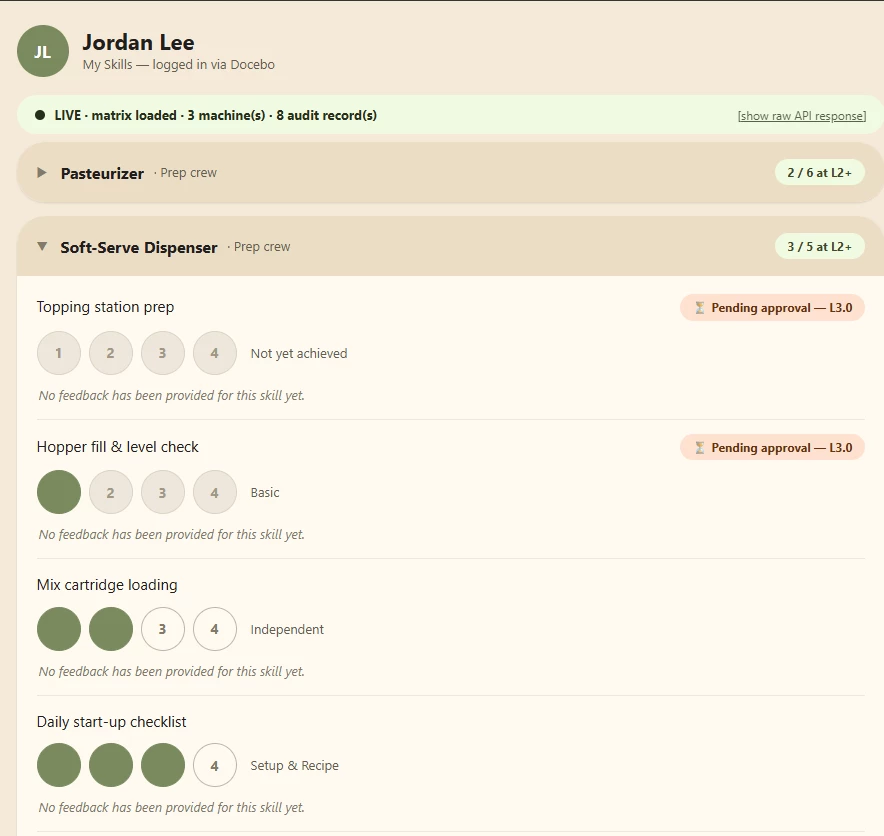
The whole application ships as a standard SCORM package, uploaded to Docebo like any other course. There is no external hosting, no server to maintain, and nothing for IT to deploy — Docebo serves it to the learner's browser from within its own player.

Once it loads, it does three things:

  1. Identity from the live session. The package reads the logged-in user straight from the SCORM runtime that Docebo exposes (cmi.core.student_id). No login, no user mapping, no second set of credentials — whoever opened the course is who the app renders for. One note from the field: Docebo returns the username there, not the numeric ID, so the middleware resolves it to the internal id_user via the Docebo API before touching any data.
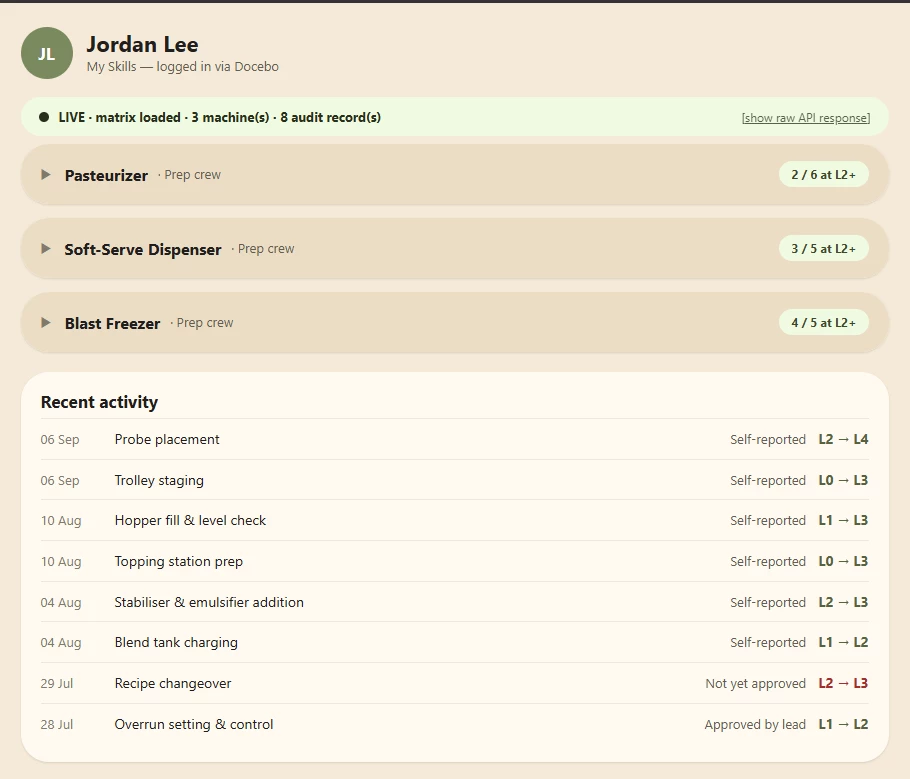
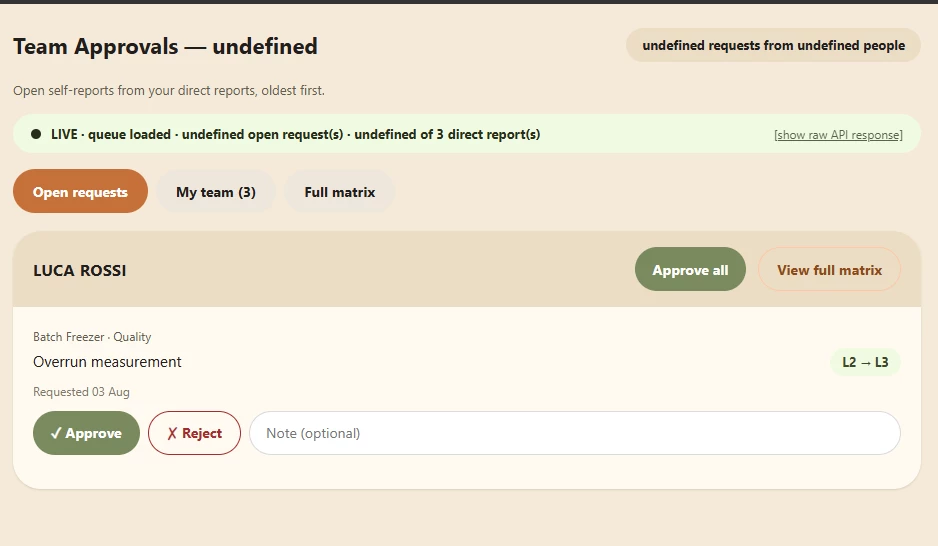
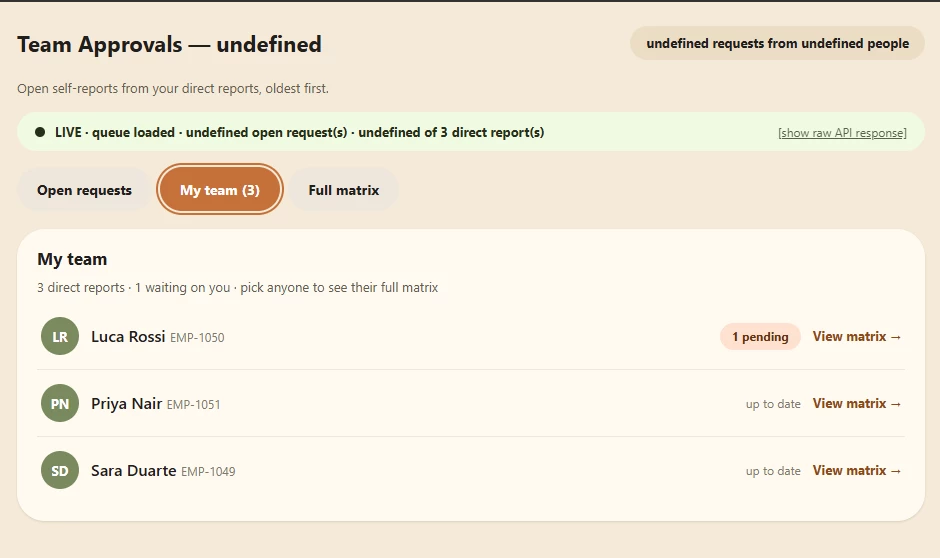
  2. Custom UI instead of the HTML-widget sandbox. Because the package owns its own window, we render full HTML/CSS/JS — cards, matrices, tabs, progress bars, approval queues — with none of the restrictions of a Docebo HTML widget.
  3. A secure call to our own API. The JavaScript calls an authenticated Workato API endpoint (token in the request header) that reads and writes the skills data tables and talks back to Docebo. All traffic is the learner's browser → our endpoint; nothing is proxied through a third-party host.

Hope this is usefull.


janina.zielecki
Contributor III
Forum|alt.badge.img+1

That’s a very nice trick ​@Moshe.Machlav! :D


dklinger
Hero III
Forum|alt.badge.img+13
  • Hero III
  • September 22, 2026

@Moshe.Machlav that is probably one of the coolest approaches I have seen in a bit.


gordon.cooke
Contributor II
Forum|alt.badge.img+1
  • Contributor II
  • September 23, 2026

Very cool approach indeed.


ntosto
  • Newcomer
  • September 23, 2026

@Moshe.Machlav great idea. Were you able to come up with a way to present this info to the user without it feeling like they were accessing a course? I’m imagining it being confusing for the user why they’re seeing their dashboard statistics by taking a course 


Moshe.Machlav
Helper III
Forum|alt.badge.img+2
  • Helper III
  • September 23, 2026

Hey ​@ntosto  great question.

Since it's a SCORM, it will always open inside the Docebo player environment. To make it feel less like a traditional course, we usually hide the player navigation (Full Screen mode) and design the internal SCORM UI to look exactly like a modern web dashboard.

It’s definitely a workaround and requires some UI compromises, but it solves the security and external-hosting barriers. If you end up trying it and find ways to optimize the player experience further, definitely share it back here with the community!