Hide Next Lesson/Previous Lesson Button on Course Player

  • September 2, 2026
  • 9 replies
  • 141 views

Hello -

We are working on enhancing our learner experience. During our User Acceptance Testing, the Next Lesson/Previous Lesson button in the Course Player was confusing for our users.   Does anyone have the CSS to hide these buttons?

Thanks for your help!


Best,

Liz

9 replies

cheyenne.carpenter
Docebian
Forum|alt.badge.img

Hi ​@eab00513! I have an even easier solution for you :) 

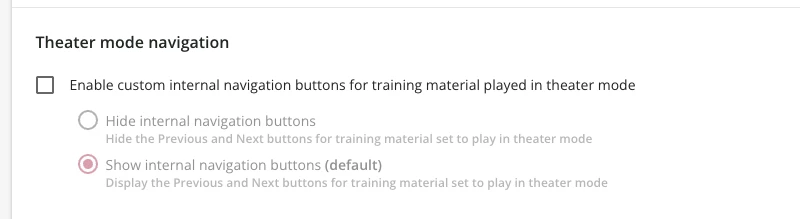
You can manage this at the course level for each course! Go to Course > Player > Theater mode navigation > Enable custom internal navigation buttons and you’ll be able to hide those buttons on a course by course basis 😊

The picture shows the default setting, you can choose to check the box and hide the buttons! 


  • Author
  • Contributor I
  • September 3, 2026

Hi Cheyenne -

Thanks for sharing! Yes, hiding the internal navigation buttons help in theater mode. However, when the user completes the course, the user still sees the buttons when exiting the course.  I’m hoping that there is a way to hide the buttons completely.

Best,

Liz


cheyenne.carpenter
Docebian
Forum|alt.badge.img

Hi ​@eab00513! I gotcha!! That makes sense :) In that case, I’d love to see responses from anyone using CSS to do this! 


cheyenne.carpenter
Docebian
Forum|alt.badge.img

Hi ​@eab00513! A colleague of mine (@erin.brisson for the win!) sent me a snippet that may work for you, depending on the CSS you already have in your platform!

Give it a shot (in sandbox if you have one!) and hopefully it works!! 


/* Hide Next Lesson and Previous Lesson buttons */ dcb-course-lesson-header-next-lesson, dcb-course-lesson-header-previous-lesson { display: none !important; }


  • Author
  • Contributor I
  • September 11, 2026

Hi ​@eab00513! A colleague of mine (@erin.brisson for the win!) sent me a snippet that may work for you, depending on the CSS you already have in your platform!

Give it a shot (in sandbox if you have one!) and hopefully it works!! 


/* Hide Next Lesson and Previous Lesson buttons */ dcb-course-lesson-header-next-lesson, dcb-course-lesson-header-previous-lesson { display: none !important; }

Hi Cheyenne (and Erin!), thank you for the assistance with the CSS. I tried it out in our Sandbox, and it didn’t work.  But it definitely gave me some ideas to try!

Thank you again for your assistance.


Best,


Liz


cheyenne.carpenter
Docebian
Forum|alt.badge.img

Hi ​@eab00513! Well shucks. Definitely keep trying (don’t be afraid to ask AI for help in troubleshooting why things may work or not work) and let us know if/when you crack the code! :) 


  • Author
  • Contributor I
  • September 11, 2026

Hi ​@cheyenne.carpenter -

Will do! Fingers crossed that the CSS code can be figured out soon :).

Best,

Liz


Forum|alt.badge.img+1

Hello -

We are working on enhancing our learner experience. During our User Acceptance Testing, the Next Lesson/Previous Lesson button in the Course Player was confusing for our users.   Does anyone have the CSS to hide these buttons?

Thanks for your help!


Best,

Liz

 

Hi Liz

I made a test on my internal platform and the following CSS seems correctly working:


.dcb-course-lesson-header-previous-lesson,
.dcb-course-lesson-header-next-lesson {
display: none !important;
}
 

As always, please note that it’s not guaranteed to be the best possible CSS solution, nor is it guaranteed to reflect across all browsers and browser version.

Please let me know if this solves your issue.

Have a wonderful day!

Roberto


  • Author
  • Contributor I
  • September 16, 2026

Hi Roberto -

Thank you so much for your help! I was able to hide the Next Lesson button on my end, but the Previous lesson button still shows. 

For now, we are choosing to keep the buttons and renaming the to help our learners with navigation.

Thank you again for your help, and I hope you have a wonderful day!


Best,


Liz