Question

Deactivated users showing on course page

  • May 1, 2026
  • 10 replies
  • 29 views

Forum|alt.badge.img

Hi Everyone

When accessing a course via Course Management the ENROLMENTS tab and the REPORTS tab still include deactivated users.  Why is this and can they be removed/deactivated so that a report can be run from the course page instead of having to use the reports function from the Admin menu?
Many thanks

10 replies

JeanetteMcVeigh
Hero III
Forum|alt.badge.img+7

From what I understand, your best bet to remove them from the enrollments list (tab) is to archive the enrollment, with the assumption that you don’t want to lose the learner history. If you are ok with losing that history, then you can unenroll the user.

Check out this knowledgebase article - https://help.docebo.com/hc/en-us/articles/11521889929490-Archiving-course-enrollments


Forum|alt.badge.img
  • Author
  • Helper I
  • May 1, 2026

Thanks ​@JeanetteMcVeigh

Unless I am misunderstanding the process it seems that each time a user leaves the company I would need to access every course they have ever completed (there are potentially hundreds) and archive the enrollment.  Is that correct?


Forum|alt.badge.img
  • Author
  • Helper I
  • May 1, 2026

@JeanetteMcVeigh Also, when all users are enrolled onto a new e-learning course deactivated users (with an expiry date) are also included in the enrolments and therefore appear on the reports.🤔


JeanetteMcVeigh
Hero III
Forum|alt.badge.img+7

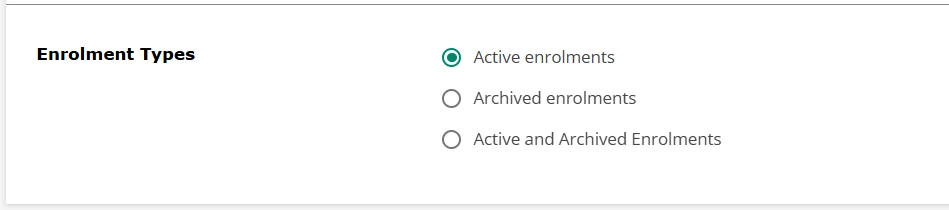
@SarahBee - it can be confusing for sure.  For reports that you create, you can hide deactivated and/or expired users as well as choose to look at active enrollment/archived enrollment or both under the Filter options in reporting (not Reports in the Course Management section, this is custom reporting section).

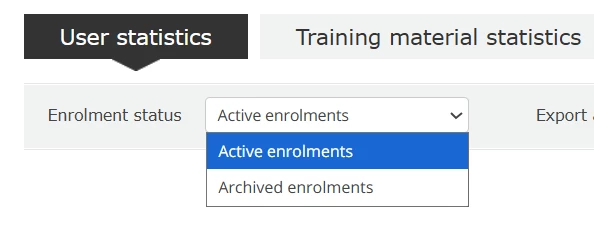
To hide/view active vs archived enrollments in the Reports tab, well, you can do that too

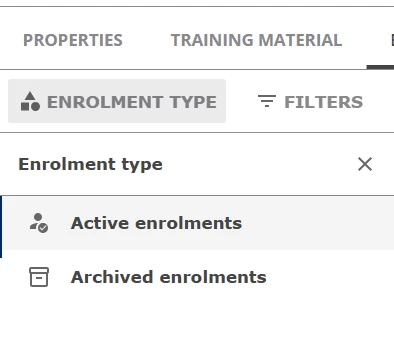
But looking at enrollments in the course tab is different...and the archiving is another level of visibility as well. By default you view Active enrollments but you can change that view as well when needed.

Your point about having to archive every time someone leaves is valid...and maybe a process you can put into a rotation to manage.

It would be interesting to hear from other admins on their processes when soemone leaves the company. There are so many options and things to think about. Check out this post 

In general, we deactivae and expire (we use expire to remember when the user account was deactivated) but never delete a user. The only time we would delete a user is if they had NO learning history in the system.

I hope this helps.


Forum|alt.badge.img
  • Author
  • Helper I
  • May 1, 2026

@JeanetteMcVeigh 
Thank you. 
We deactivate and expire too but this doesn’t appear to prevent the issue with deactivated users appearing on the report as they continue to appear as active enrolments for e-learning courses that have been created long after the user has been activated.

We have a number of Power Users who have access to limited training data and I would like them to be able to run an accurate report from the course page, without copious amounts of on-going admin support to enable this to happen.

I suspect this is yet another irritating and non-user friendly aspect of the system 😒


JeanetteMcVeigh
Hero III
Forum|alt.badge.img+7

@SarahBee   It seems that archiving the enrollments would be the option you need for your PUs to see what you want them to see.

Maybe submit an IDEA to have an option that the system can automatically archive enrollments for users when we deactivate them in the system.

I would vote on that for sure!!!


Forum|alt.badge.img
  • Author
  • Helper I
  • May 1, 2026

Thanks ​@JeanetteMcVeigh 
I’ll certainly will 👍🏽


Forum|alt.badge.img
  • Author
  • Helper I
  • May 1, 2026

@JeanetteMcVeigh FYI  This idea has already been submitted to years ago so I don’t hold out much hope of anything changing 😊

Automatic User Enrollment Archival when Deactivated | Community


JeanetteMcVeigh
Hero III
Forum|alt.badge.img+7

@SarahBee  I put your thoughts and the htoughts in the other idea you referenced and put them into the new Idea submission template.
The more we talk about things, post ideas, the more (hopefully) Docebo will listen.  It’s a great opportunity for improvement too!

Please vote for all ideas, open or closed, as Docebo can see all of that.  Here’s to hoping.

Also, if you have anything to add to the new idea, please add!!!  thanks.


Forum|alt.badge.img
  • Author
  • Helper I
  • May 1, 2026

Thanks ​@JeanetteMcVeigh 
Much appreciated 😊