

Question

How to pass a Custom Video Conference Tool URL to Outlook Calendar Invites?

  • March 27, 2026
  • 2 replies
  • 30 views

Hi everyone,

I’m currently setting up the Outlook 365 Calendar integration via Docebo Connect (Workato). We use Microsoft Teams and instead of using the native VILT Teams integration, we paste our meeting links directly into the ILT Event using the Video conference tool > Custom tool > URL text box.

My goal is to embed that specific Custom Tool URL field into the HTML message template so that learners can see the meeting link directly inside their Outlook calendar invites sending from Docebo.


I created a custom string field in my HTML Message Template schema (e.g., webinar_link) and inserted it into the message template script but  I am having trouble locating the exact data pill that corresponds to the Custom tool URL I pasted into the event page.
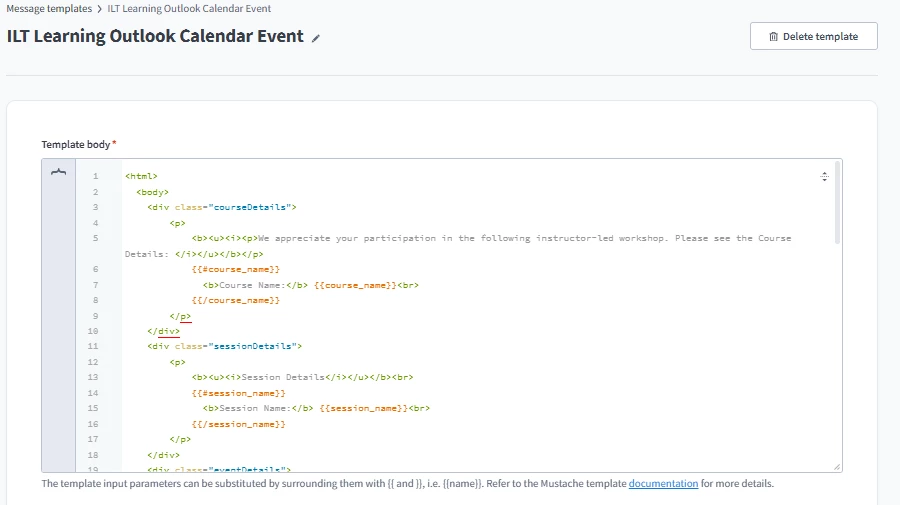


Has anyone successfully mapped this specific field in the Outlook Calendar Invite?

Any advice or screenshots of how you mapped this in your recipe would be greatly appreciated.
Thank you!


2 replies

Forum|alt.badge.img+2
  • Novice III
  • March 27, 2026

Following! I am currently in the configuration/testing to use Docebo for our inperson and virtual events. Being able to configure the calendar invite would allow us flexibility in how learners join.


Moshe.Machlav
Helper III
Forum|alt.badge.img+1

Hi ​@spopp & ​@kim.sin ,

Before you finalize this recipe, I want to flag a major architectural hurdle with this approach.

If you successfully embed the direct Microsoft Teams URL into the Outlook invite, your learners will click it and join the meeting completely outside of Docebo. Because they aren't launching the webinar from inside the platform, Docebo has no way to automatically track their attendance.

In organizations I've worked with that built this exact flow, they quickly realized their LMS reporting was showing zero attendance. To fix it, you either have to manually mark attendance in Docebo for every single session, or build a second complex integration that pulls attendance reports from MS Teams and pushes them back into Docebo.

The standard best practice is to use the Outlook invite to link learners back to the Docebo event page. When they click "Join" inside Docebo, attendance is automatically captured. 

If you absolutely must have the raw custom URL in the calendar block, standard Docebo Connect triggers don't always expose the custom tool URL out of the box. You will typically need to add an HTTP action in your Workato recipe to call the Docebo API (GET /learn/v1/events/{event_id}) and parse the videoconference_url from the response to use as your data pill.

Let me know if you want to dig deeper into the API step or the standard event-link flow.


