
Question

How to Remove Questions from a Course

  • July 31, 2026
  • 2 replies
  • 18 views

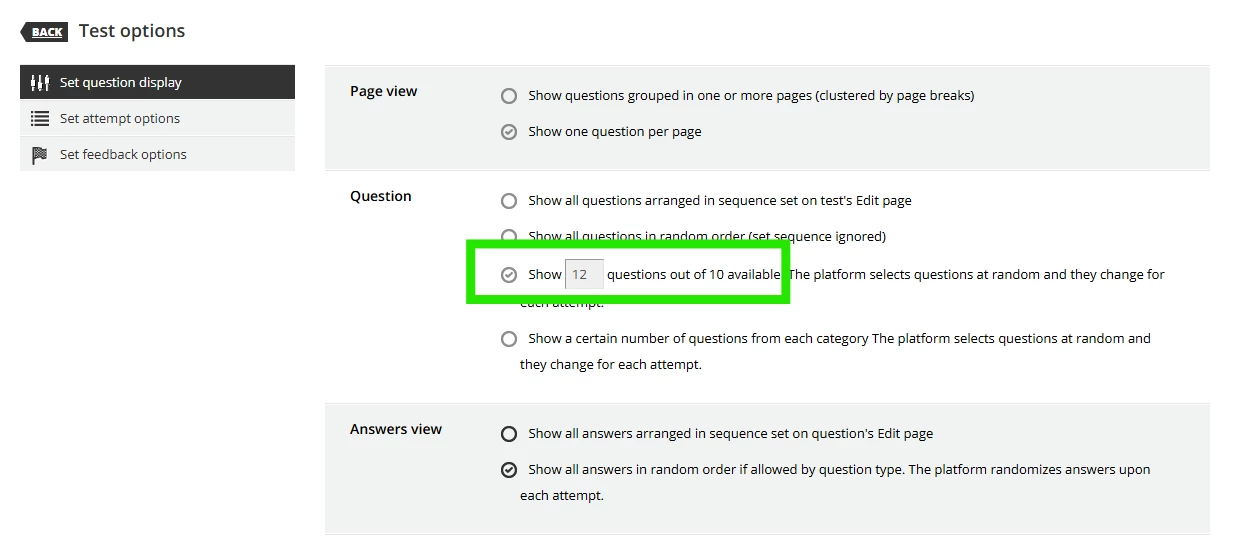
 I was able to remove two questions from a course created using the red X. When I go to Test Options and my students still see 12 questions instead of 10 even though the extra 2 questions are blank screens. Snippet below shows that the 12 is greyed out and I cannot change it to 10. 
 

2 replies

lrnlab
Hero III
Forum|alt.badge.img+10
  • Hero III
  • August 2, 2026

Hi ​@Maximiliano once a test has been started by a user, certain options cannot be changed. This may be the case in your example. If you are able to reset all user attempts, you should be able to rebuild the exam with only 10 questions. If not, you might want to copy the exam and deactivate the original; leaving those who have already started and are in progress to complete the version they already launched or reset all but the completed ones.


  • Author
  • Newcomer
  • August 4, 2026

Thank you for the assist, ​@lrnlab !


