Hello, this feels like a really silly question! We use pages to collate together content for our catalogues on our user menu.
I recently wanted to change one of these pages, so I have amended the name of the page/the catalogue name. However, I cannot work out for the life of me where the URL of the page is coming from - it’s still saying the old name of the catalogue not the updated one.
I have loooked through the help guides on pages but I still can’t work out how to amend the URL/generate a new URL.
Does anyone have any ideas?
Best answer by sjennings78
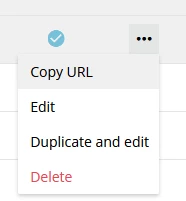
Are you getting the URL from Page Management, by selecting the Copy URL option for that page or are you just browsing to it from an old/existing link? It does not re-direct you to the “new” URL for the page if you are using an existing link. But I have found that what comes after the page ID part of the URL doesn’t really matter, so the old links will continue to work. But every time that I’ve renamed a page, the URL for it does update if i make the change and then go back to the main Page Management page and then select Copy URL option for that page. This option:
Are you getting the URL from Page Management, by selecting the Copy URL option for that page or are you just browsing to it from an old/existing link? It does not re-direct you to the “new” URL for the page if you are using an existing link. But I have found that what comes after the page ID part of the URL doesn’t really matter, so the old links will continue to work. But every time that I’ve renamed a page, the URL for it does update if i make the change and then go back to the main Page Management page and then select Copy URL option for that page. This option:
But I have found that what comes after the page ID part of the URL doesn’t really matter, so the old links will continue to work.
I believe once you name the url “beyond the root” the first time - it is held onto. That said - exactly what @sjennings78 said is true. You can change the name to whatever you like because the system is going to redirect based on the root of the url:
Just be aware that the system will not hold onto it under page management.
Unfortunately, if you absolutely must generate a brand new url that the system will “manage”? Well you need to create a new page. That is the one-time chance you get to reestablish the url beyond the root.
Ah last note - even if you totally make up whateveryoulike above? You do need something beyond the root for it to be a valid url and to avoid a 404 error. In human terms:
Tagging on to Dan - he rightfully calls out, the ‘stub’ which is built based on the name can technically be anything and it will still resolve, its a good trick to keep in your back pocket btw, but if you insert links to anything they won’t adjust but still resolve. Is kind of an annoyance of the current URL methodology, they don’t act as alias’s which is what it sounds like you are initially thinking of it like.